
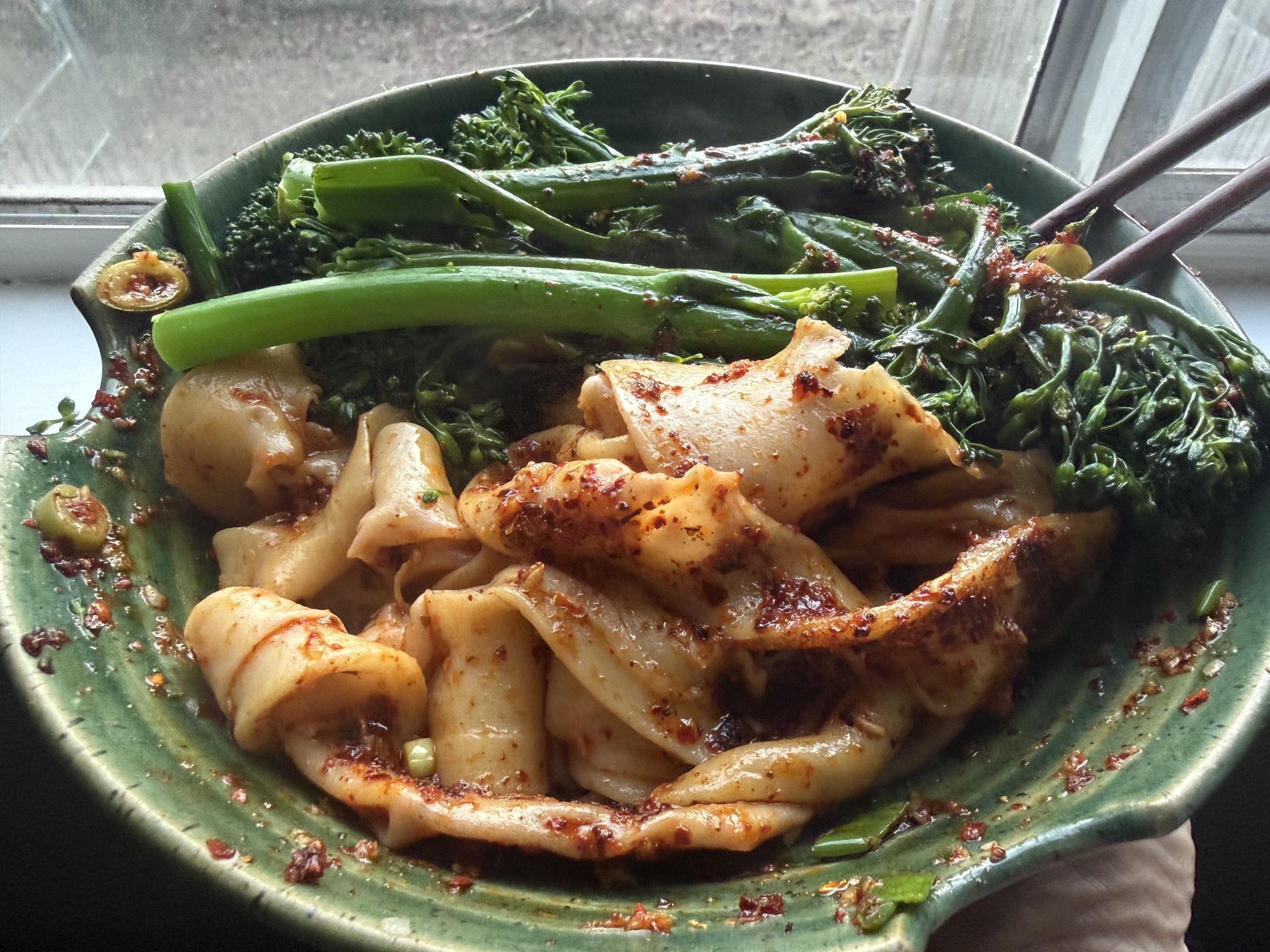
I spent 2 hours and 10 minutes actively supervising the construction of a complete web application. Twenty-one tickets, 53 story points, 21 pull requests merged, roughly 8,500 lines of code. During one epic I was in the kitchen making biang biang noodles from scratch. During another I was helping my daughter with history homework. My total hands-on-keyboard time for the build phase was about what most developers spend in a single standup cycle.
But the numbers aren't what made it repeatable. The process is.
Over the past year, I've been developing a methodology for AI-augmented web development across multiple client projects at Infinity Interactive. What started as "let me try having Claude write some code" evolved into a structured four-phase workflow that consistently compresses multi-month timelines into weeks of part-time work. The methodology got tighter with each project. By the most recent one, I'd stopped thinking of AI as a tool I used and started thinking of it as a team member I managed.
To validate that the methodology was teachable, not just something that worked in my hands, I designed a training exercise for my team: a small community event board built from scratch using the full workflow. I ran through it myself first, documenting everything obsessively so my teammates could see exactly how the decisions got made. This post is what I learned.
How the Loop Works
The workflow has four phases that repeat in a sprint cycle: Plan, Assign, Build, Retro.
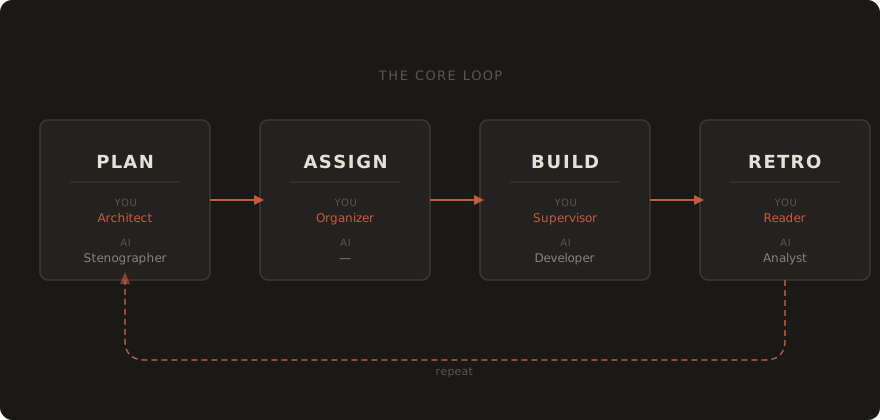
In Plan, I'm having an architecture conversation with Claude Desktop. I describe what we're building, what tech stack, what the constraints are. Claude asks questions I haven't thought of yet, then structures my thinking into documentation, epics, and detailed tickets. This phase typically takes 60 to 120 minutes and produces everything the build phase needs.
In Assign, I sequence the tickets, set priorities, identify dependencies. This is 15 minutes of manual work. Infrastructure before features, data layer before UI.
In Build, Claude Code (the CLI tool) does the implementation, ticket by ticket. I supervise. That means: kick off a ticket, let it work, check the diff when it's ready, approve the commit, approve the push, review the PR. Automated review agents catch what I miss. I merge when satisfied.
In Retro, Claude Code writes the initial retrospective document from the sprint artifacts and conversation history. Then Claude Desktop reviews and expands it with additional context, cross-referencing the planning docs and build logs. I review the analysis, and Claude Desktop adjusts tickets and epics for upcoming sprints accordingly.
The role division is the important part. I'm the architect who makes decisions. During planning, Claude is the stenographer who structures my thinking. During building, Claude Code is the developer who writes code. During retro, Claude is the analyst. At every stage, I approve every commit, every push, every merge. No exceptions.
What I Built
The training project was a community event board for a fictional neighborhood association. Public-facing static site where residents can browse, search, and filter local events. Familiar domain, exercises the full workflow, mirrors real client patterns.
I chose SvelteKit with Svelte 5, static adapter, MDsveX for markdown-based event content. Eighteen sample events with search-as-you-type, category filters, responsive design, accessibility compliance. The whole thing deploys to GitHub Pages.
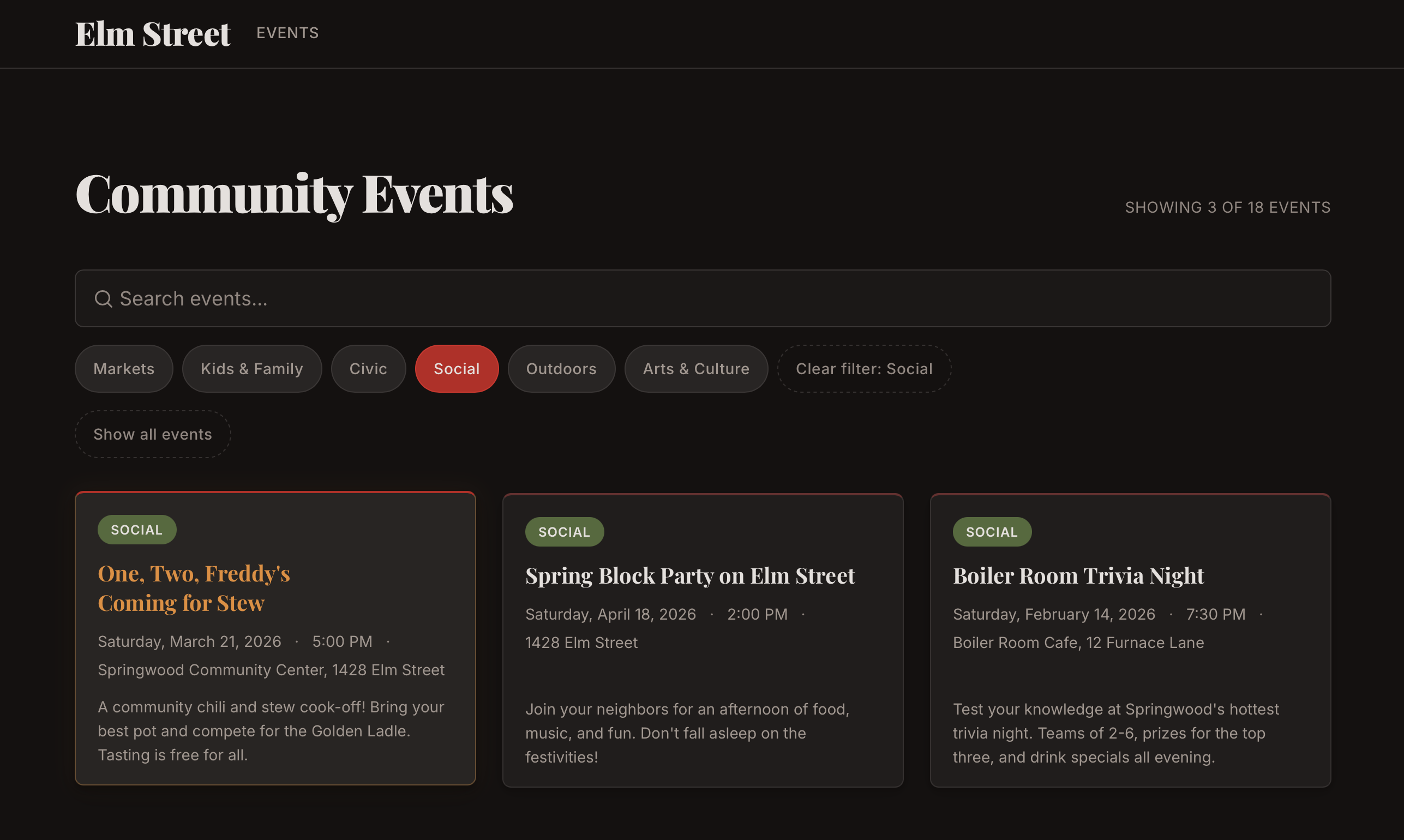
The creative direction was a Nightmare on Elm Street theme, because the fictional client was the "Elm Street Community Association" and I couldn't resist. Dark palette, blood red accents, Freddy's sweater green as the secondary color, event titles like "Nightmare 5K Fun Run" and "Elm Street Séance & Social Hour." One of the hero section components has a barely-visible striped Easter egg at 6% opacity.
Silly? Sure, but it's a quirk that worked. The strong creative direction forced the AI to make consistent aesthetic choices instead of defaulting to generic templates. Every event description, every color pairing, every piece of copy had a guiding sensibility to follow. Creative constraints helped here the same way they usually do — they gave the AI something specific to follow instead of reaching for safe defaults.
What 105 Minutes of Planning Produced
Here's where most people's mental model of "AI coding" breaks down. They imagine typing a prompt and getting a project back. The reality is that the build phase was easy because I spent 105 minutes planning before a single line of code existed.
The planning conversation was a real conversation, not a prompt. I described the architecture. Claude asked whether search should be client-side or server-side. I said client-side, it's a static site with 20 events, no need for a server round-trip. Claude asked about the content pipeline. I said MDsveX, one markdown file per event, frontmatter for metadata. Claude asked about the data model. I described the fields. It structured all of this into an epic plan with dependency chains and story point estimates.
A note on story points, since they're controversial even in conventional development: I'm not using them to estimate time. In this workflow, time-to-implement is almost meaningless as a planning metric. I use them as a shorthand for how complex the ask is — how much architectural thinking the ticket requires, how carefully I'll need to review the output, how many moving parts are involved. A 2-point ticket means I'll glance at the diff and approve. A 5-point ticket means I'm reading every line and probably testing in the browser. They're a gauge for my review effort, not the AI's build effort.
That conversation produced three reference documents: a Technical Architecture spec (stack decisions, data flow, component hierarchy), a Design Brief (color theory, typography rationale, mood references, component-level direction), and an Event Content Guide (character names, tone, category definitions). Each document was detailed enough that a specialized AI agent could work from it independently, without needing me to re-explain context.
Then we wrote tickets. Twenty-one of them across five epics, each with detailed acceptance criteria. A good ticket for this workflow reads like a spec: exact field names, expected sort behavior, specific responsive breakpoints, accessibility requirements. This matters because the ticket becomes the prompt. When I hand a ticket to Claude Code, it should contain everything needed to complete the work without me re-explaining the architecture.
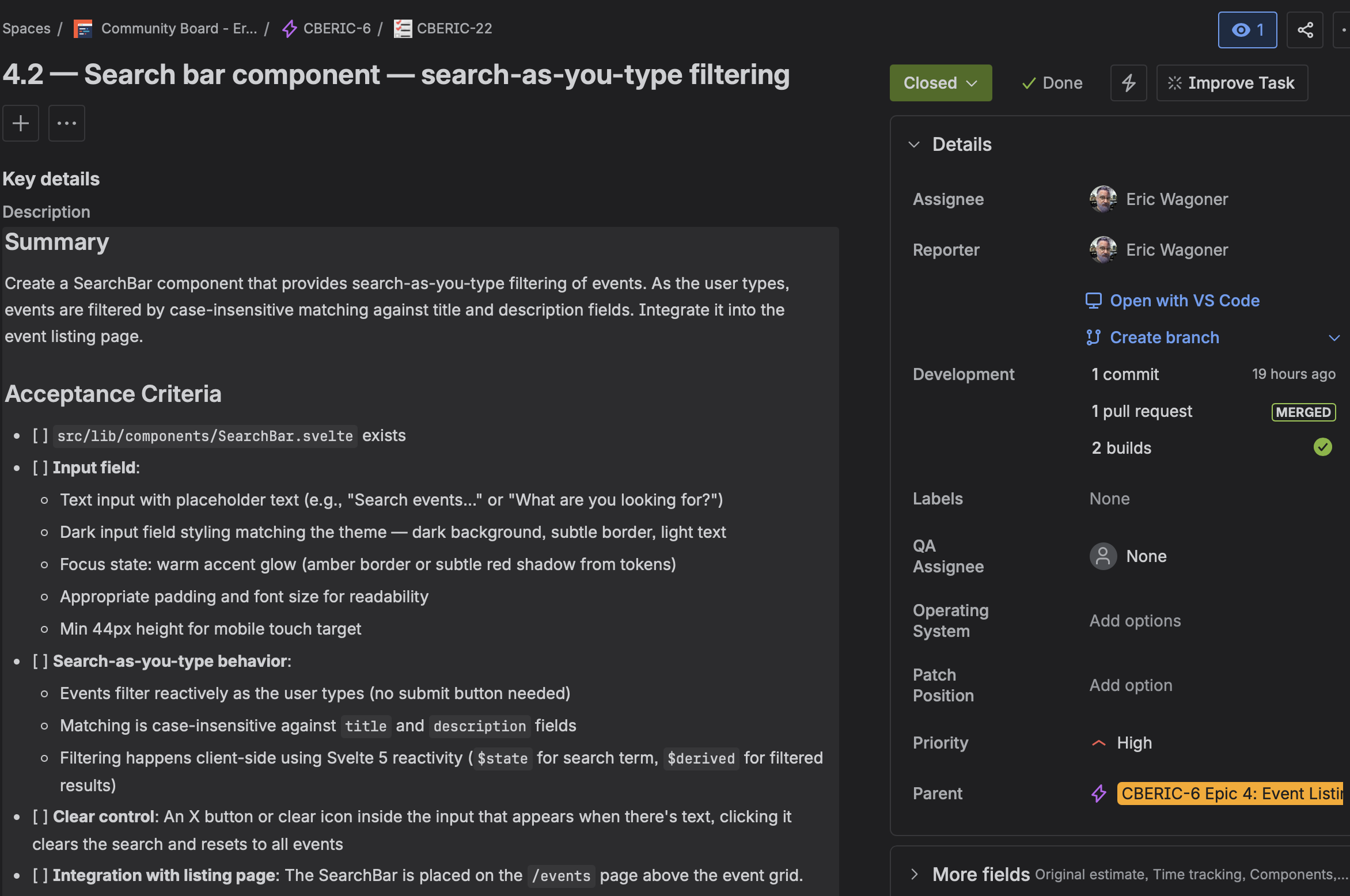
Here's a concrete example. The acceptance criteria for the EventCard component included: full-card link wrapped in <a>, <article> landmark with aria-labelledby, metadata rendered as <dl> with visually-hidden labels, category badge with token-based colors, three-line description clamping, hover lift with prefers-reduced-motion guard, and 44px minimum touch targets. Claude Code implemented all of it on the first pass. The review layer found one addition (a global reduced-motion reset) and zero bugs. That's what a good ticket produces.
The vaguer tickets produced worse results. The README/documentation ticket had loose acceptance criteria and became the most review-intensive PR of the project: five commits, five review rounds, ten issues. The documentation deserved the same rigor as the features. I didn't give it that, and it showed.
What Supervision Actually Looks Like
During Epics 2 and 3, I was barely at my desk. I kicked off a ticket, went to the kitchen to knead dough for biang biang noodles, and came back ten minutes later. Claude Code had created the event loading utility, written 16 integration tests, set up ESLint and Prettier, configured a CI workflow, and was waiting for me to approve a commit. I read the diff on my phone, approved, went back to my dough. Came back again when it pinged for the push approval. Approved. The PR went up, automated reviews ran, I read the review comments while the noodles rested, told Claude Code to fix the two things the reviewers flagged, approved those commits, merged. Total active time for 13 story points: about ten minutes. The remaining epics were similar — homework help, vegetable prep, and occasionally walking over to the computer to approve a commit. Maybe fifteen minutes of active attention for the entire landing page.
I want to be careful about how this reads. The work itself was significant, but supervision stayed lightweight because I'd front-loaded the decisions. If I'd skipped the architecture conversation and the detailed tickets, the build phase would have been full of confusion, rework, and re-explanation. The noodle-making ratio only works when you've spent the time planning.
The approval gates are also non-negotiable. I approve every step. This isn't paranoia. Claude Code is good, but it makes mistakes that are easy to catch in a diff and hard to catch after they've shipped. The scaffold command overwrote my README with generic boilerplate. A favicon was generated at 1422x1422 pixels (259KB for a 16px icon). Event page titles were rendering URL slugs instead of human-readable names. Each of these was a quick catch at the approval stage and would have been a debugging session after the fact.
There was also an acceleration curve I didn't expect. Epic 1 (foundation) took about an hour of active work. By Epics 4 and 5 (event listing, detail pages, search, filters), the active time was 20 to 25 minutes combined. This wasn't just because later tickets were smaller. The foundation work compounded. Design tokens, global styles, tested utilities, established patterns. By mid-project, Claude Code was composing from existing conventions rather than inventing new ones, and I was reviewing familiar patterns rather than evaluating novel approaches.
Three Layers of Review
The review system was the part of the workflow I was most skeptical about, and it turned out to be the most valuable.
Every PR gets three reviewers: Cursor's Bugbot, a Claude GitHub Action, and me. Each catches different things.
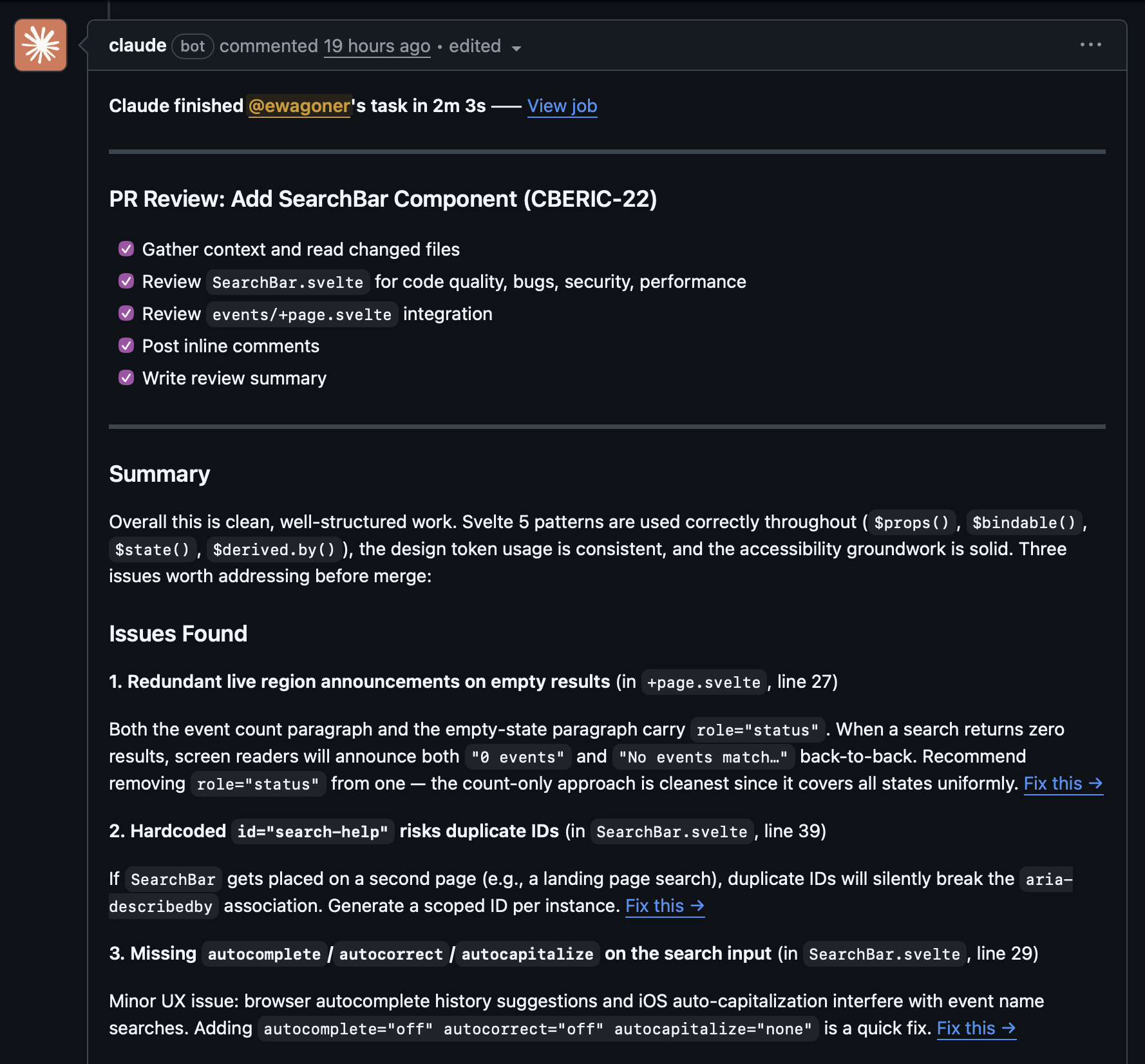
Bugbot writes a risk assessment summary at the top of each PR and flags structural concerns. It caught that CSS custom properties can't be used in @media queries (a spec limitation I'd forgotten about), flagged a machine-specific config file being committed, and identified sort-order inconsistencies between related utility functions. Good signal-to-noise ratio, maybe one false positive across the whole project.
The Claude GitHub Action does granular inline review. It caught a timezone bug that would have shipped to production: new Date('2026-04-18') parses as UTC midnight, which means US timezone users would see today's events listed as yesterday. The fix was three characters (T00:00:00), but I would not have caught it on my own. It also caught a 100vh fallback gap for older browsers, focus ring inconsistencies, a z-index stacking issue where a gradient overlay was rendering on top of readable text, and a hard-coded color value that violated the project's design token convention.
My review handles judgment calls. When Bugbot flagged Vite scripts in package.json as "bypassing the SvelteKit CLI," I knew that was a false positive because modern SvelteKit uses Vite directly. When Claude suggested adding a new --color-white token, I chose the existing off-white token instead. When a review noted an orphaned card in a 3-column grid with 5 items, I decided that was fine. The bots surface issues. Which ones actually matter is still my call.
Across 21 PRs, the automated reviewers caught roughly 40 to 50 issues I didn't catch myself. The timezone bug alone justified the entire review setup.
But I should be honest about the limitation. There's a recurring accessibility bug that appeared four times across PRs #13 through #16: duplicate aria-live regions, where Claude Code would add role="status" to a new element without removing it from an existing one, causing screen readers to announce changes twice. The reviewers caught it every single time. But Claude Code kept reintroducing it because each PR started with fresh context. It couldn't carry the lesson forward.
The fix was adding a one-line rule to CLAUDE.md (the persistent project instructions file). After that, the bug never recurred. Which tells you something about the architecture of the system: cross-session learning doesn't happen automatically. You have to write it down. And you should write it down faster than I did, because three unnecessary review round-trips is a waste even when the reviewers are free.
A Different Job
This workflow changes what you do all day. I spent more time on architecture conversations, requirements writing, diff reading, and judgment calls. I spent almost no time typing code, debugging syntax errors, or writing boilerplate.
The skills that matter shift accordingly. Decisiveness matters a lot. In the planning conversation, Claude surfaces questions you haven't considered. "Should the event cards link to detail pages or expand inline?" "Do past events sort reverse-chronologically or get hidden?" "What happens when a search returns zero results?" You need to answer these quickly and clearly, because the answer becomes part of the ticket, which becomes the implementation. Waffling in planning produces vague tickets, which produce confused implementations, which produce heavy review cycles.
Clear requirements writing matters. The difference between "make it responsive" and "test at 375px, 768px, and 1200px; navigation collapses to hamburger below 768px; touch targets minimum 44px; event cards stack to single column on mobile" is the difference between a one-pass implementation and three rounds of revision.
Diff reading matters. You need to understand what every line of code does, even though you didn't write it. When I reviewed the EventCard component, I needed to know whether aria-labelledby on both the <article> and the inner <a> was intentional and valid (it was), whether the three-line clamp used -webkit-line-clamp with proper fallbacks (it did), and whether the hover transform had a reduced-motion guard (it didn't, which the review caught). You can't approve what you can't evaluate.
And knowing when to push back matters. Claude Code occasionally proposes solutions that are technically correct but architecturally wrong for the project. When it suggested a separate component file for 30 lines of about-section content, I said no, inline it. When it generated a comprehensive test suite for a simple date formatting function, I kept the boundary tests and cut the redundant ones. When it wanted to add a new design token for a single use case, I pointed it at the existing token. These are small decisions, but they compound across a project.
I'll be direct about the tension, though. Some developers love the part of the job this workflow automates. The satisfaction of solving an algorithmic puzzle, the flow state of typing code, the craft of a well-structured function. This workflow moves your value away from that and toward management, architecture, and review. If you got into this field because you love writing code, the shift might feel like a loss. If you got into this field because you love building things, it might feel like a superpower.
Cost and Practicality
The entire toolchain costs between $40 and $240 per month. Claude Pro at $20 gives you Claude Desktop for planning, Claude Code for building, and the model access for both. A code review tool runs $0 to $40 depending on what you choose. Claude Pro Max at $200 gives higher rate limits and is what I'd recommend for real client work, but Pro is fine for smaller projects and training exercises.
No API costs. Everything runs through the Claude subscription. The training project ran on Pro Max and never hit a rate limit.
Compare that to the traditional alternative. This project was scoped at roughly 50 story points across 21 tickets. In a conventional workflow, that's probably 40 to 60 developer-hours depending on experience and the framework. At shop rates, that's several thousand dollars of labor. The AI workflow compressed it to about 4 hours of my active time (2 hours planning, 2 hours 10 minutes supervising) plus 12 hours of wall-clock time. The economics are hard to argue with.
The caveat is that this requires architectural skill. You can't skip the planning phase and get these results. A junior developer who can write great code but hasn't internalized system design patterns will struggle with the "architect" role this workflow demands, because the AI handles implementation but the human still owns every judgment call. If you don't have the judgment yet, the AI just builds the wrong thing faster.
What I'd Do Differently
I have a short list, and it's more useful than the success stories.
Update CLAUDE.md faster. The aria-live duplication recurred three times before I added the convention rule. Each recurrence was caught by reviewers, but it was wasted effort. Any time a review catches a pattern issue, that pattern should go into CLAUDE.md the same day. One line of persistent instruction prevents multiple rounds of review feedback.
Batch tightly-coupled tickets. The landing page had four tickets: Hero, Upcoming Events, About/CTA, and Assembly. The assembly ticket resolved itself naturally as the other three merged in sequence, because they all built on the same page file. Four separate PRs for one feature page created unnecessary review overhead. Next time I'd combine those into two tickets at most.
Treat documentation with the same rigor as features. The README ticket had loose acceptance criteria and became the most review-intensive PR of the project. It also spawned a CLI script that had three bugs caught in review (accepted impossible dates like February 30, allowed unsanitized input in slug overrides, and produced invalid YAML from double-quoted user input). I treated it as a wind-down task. It deserved a proper spec.
Establish CSS conventions earlier. The width: 100vw scrollbar issue appeared in two different PRs with two different fixes. After the first occurrence I should have documented the preferred pattern (calc(50% - 50vw) negative margins) so Claude Code would use it consistently. Instead I got two solutions to the same problem, one of which was worse than the other.
Create a living conventions document from day one. Beyond CLAUDE.md, a project-level conventions reference covering accessibility patterns, CSS approaches, and component structure would have prevented inconsistencies that accumulated across PRs. Each individual implementation was defensible in isolation. The inconsistency across the project created unnecessary review churn.
Getting Started
If you want to try this workflow, here's what you actually need to do.
Get a Claude Pro subscription. Install Claude Code (npm install -g @anthropic-ai/claude-code). Set up at least one automated code review tool on your GitHub repo. The free Claude GitHub integration works fine to start.
Create a Claude Project and load it with context: your project requirements, technical constraints, design references, anything you'd hand to a new developer joining the team. Have a planning conversation. Let Claude ask questions. Make decisions. Let it structure your thinking into documentation and tickets.
Write tickets with detailed acceptance criteria. Specific fields, expected behaviors, responsive breakpoints, accessibility requirements. If the ticket is vague, the code will be too.
Turn off auto-commit, auto-push, and auto-merge. Read every diff. You need to understand what you're shipping.
Build ticket by ticket. Let Claude Code work. Check in when it's ready for approval. Feed review comments back for fixes. Merge when you're satisfied.
Run a retro after each sprint. Let Claude analyze what happened. Read the analysis. Apply the learnings. Update your project instructions with any conventions the reviews surfaced.
The acceleration curve is real. Your first epic will feel slow and unfamiliar. By the third or fourth, you'll be reviewing diffs while making dinner.
I made noodles while the AI built my project. I also spent almost two hours before that making sure it would build the right one. If there's a takeaway, it's that the ratio between those two activities matters more than either number on its own. The workflow redirects your time toward architecture, quality judgment, and creative direction. The code follows from that.
We've been building software for clients for over 25 years, and this workflow is how we're doing it now. If you're curious what AI-augmented development could look like for your team or your next project, get in touch — we'd be happy to walk through it with you.